
Repository
GitHub - dogukannulu/stock-sentiment-platform
The Problem
Financial sentiment data is everywhere. Earnings summaries, analyst notes, news wires — all of it moves markets. The problem is that nobody is processing it in real time for individual tickers, correlating it with live price data, and making it queryable through plain English.
Commercial solutions exist, but they’re priced for hedge funds. Open-source alternatives are either stale demos or toy scripts that fall apart under real load.
I wanted to build something production-grade: proper schemas, a real message broker, time-series storage, version-controlled SQL transformations, a live dashboard, an AI analyst agent, and an evaluation suite that proves the sentiment scoring actually works.
Here’s everything I built, how I built it, and the lessons I learned along the way.
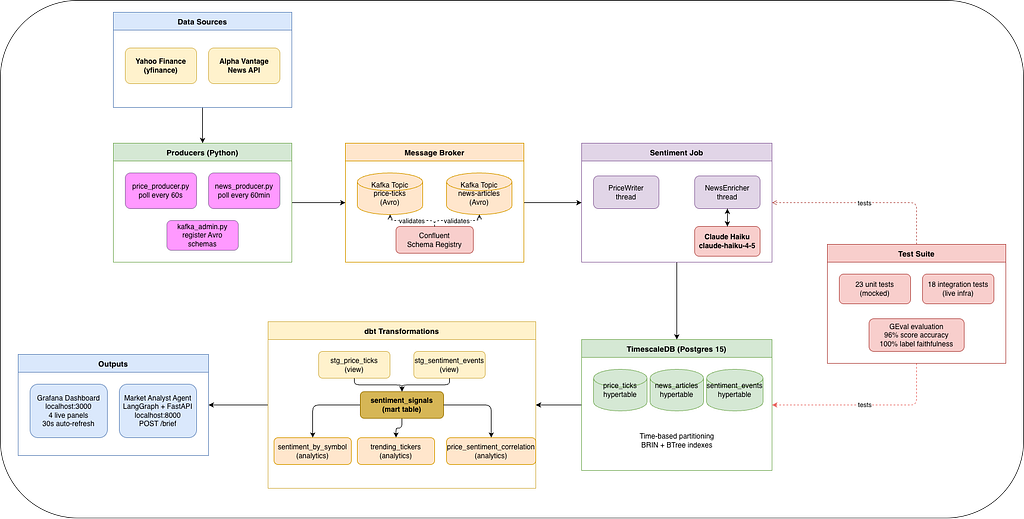
Architecture Overview
Yahoo Finance (yfinance)      Alpha Vantage News API
        |                              |
  price_producer.py           news_producer.py
        |                              |
  Kafka: price-ticks          Kafka: news-articles
  (Avro schema)               (Avro schema)
                    |
            Confluent Schema Registry
                    |
            Sentiment Job (Python threads)
  (Claude Haiku scores each article → TimescaleDB)
                    |
            TimescaleDB
(price_ticks · news_articles · sentiment_events)
                    |
              dbt models
(staging views → sentiment_signals mart → analytics schema)
                    |
        ┌───────────┴────────────┐
   Grafana Dashboard      AI Market Analyst Agent
   (4 live panels)        (LangGraph + FastAPI /brief)
The Stack
- Apache Kafka + Zookeeper
- Confluent Schema Registry (Avro)
- Threaded Kafka Consumers (Python)
- Anthropic Claude API (claude-haiku-4–5)
- TimescaleDB (Postgres 15)
- dbt-postgres
- Grafana
- LangGraph + FastAPI
- DeepEval GEval
- Docker
Step 1: Setting Up the Infrastructure
Everything except the Python processes runs in Docker Compose — Kafka, Zookeeper, Kafka UI, Confluent Schema Registry, TimescaleDB, and Grafana. The full stack comes up with one command:
docker compose up -d
docker ps
# 6 containers: zookeeper, kafka, kafka-ui, schema-registry, timescaledb, grafana

The key design decision here: Kafka acts as the durable buffer between data ingestion and processing. If the sentiment job goes down while Claude is being slow or rate-limited, messages queue up in Kafka and are processed when the job restarts. The producers never block.
Why Avro + Schema Registry? Because raw JSON is a footgun at scale. Schema Registry enforces data contracts at the message level — if a producer sends a message with a missing required field, the registry rejects it before the message even enters the topic. Here’s the price tick schema:
{
  "type": "record",
  "name": "PriceTick",
  "fields": [
    {"name": "event_time", "type": "string"},
    {"name": "ticker",     "type": "string"},
    {"name": "price",      "type": "double"},
    {"name": "volume",     "type": ["null", "long"], "default": null},
    {"name": "source",     "type": "string", "default": "yahoo_finance"}
  ]
}
Step 2: TimescaleDB Schema
TimescaleDB is Postgres with automatic time-based partitioning. That means a query like “give me NVDA sentiment for the last 24 hours” hits a partition scan instead of a full table scan — orders of magnitude faster at scale.
Three hypertables power this whole system:
-- Raw price ticks from Yahoo Finance
CREATE TABLE IF NOT EXISTS price_ticks (
    event_time  TIMESTAMPTZ NOT NULL,
    ticker      TEXT        NOT NULL,
    price       NUMERIC     NOT NULL,
    volume      BIGINT,
    source      TEXT        DEFAULT 'yahoo_finance'
);
SELECT create_hypertable('price_ticks', 'event_time', if_not_exists => TRUE);

-- Raw news articles from Alpha Vantage
CREATE TABLE IF NOT EXISTS news_articles (
    event_time          TIMESTAMPTZ NOT NULL,
    ticker              TEXT        NOT NULL,
    article_id          TEXT        UNIQUE,
    title               TEXT,
    body                TEXT,
    source              TEXT,
    url                 TEXT,
    av_sentiment_score  NUMERIC,
    av_sentiment_label  TEXT
);
SELECT create_hypertable('news_articles', 'event_time', if_not_exists => TRUE);
-- Enriched sentiment events (output of Claude scoring)
CREATE TABLE IF NOT EXISTS sentiment_events (
    event_time      TIMESTAMPTZ NOT NULL,
    ticker          TEXT        NOT NULL,
    source          TEXT        NOT NULL,
    sentiment_score NUMERIC,
    sentiment_label TEXT,
    raw_text        TEXT,
    price_at_event  NUMERIC,
    metadata        JSONB
);
SELECT create_hypertable('sentiment_events', 'event_time', if_not_exists => TRUE);
Step 3: The Kafka Producers
Two independent producers run in separate terminals (or as separate processes):
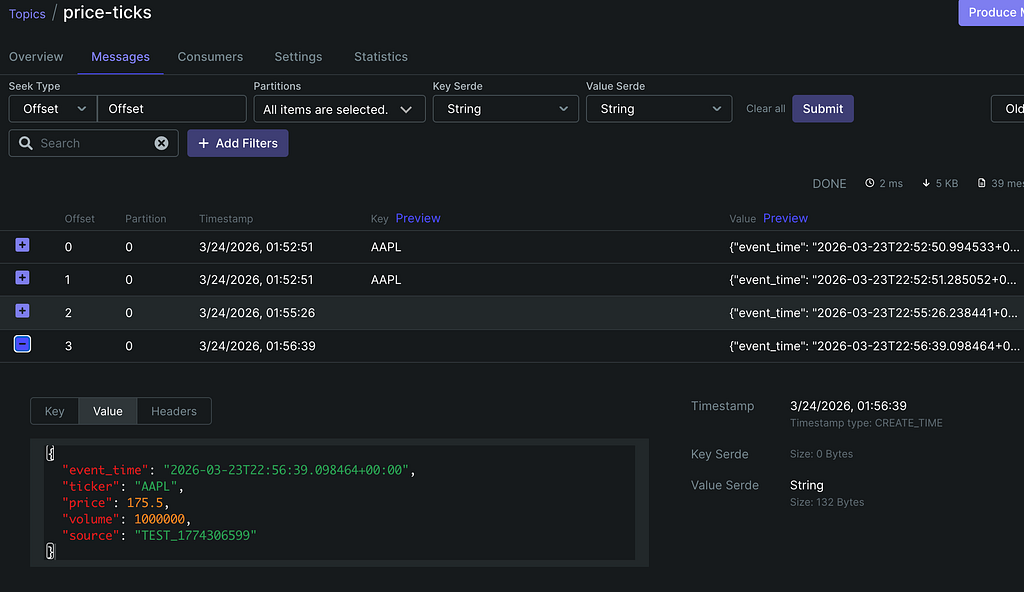
price_producer.py polls Yahoo Finance every 60 seconds for 5 tickers: AAPL, GOOGL, MSFT, TSLA, NVDA.
def fetch_and_produce(producer):
    for ticker in TICKERS:
        data = yf.Ticker(ticker)
        info = data.fast_info
        price = info.last_price
    if price is None:
            logger.warning(f"No price data for {ticker}, skipping.")
            continue
        message = {
            "event_time": datetime.now(timezone.utc).isoformat(),
            "ticker": ticker,
            "price": round(float(price), 4),
            "volume": int(info.three_month_average_volume) if info.three_month_average_volume else None,
            "source": "yahoo_finance",
        }
        producer.send(KAFKA_TOPIC, value=message)
        logger.info(f"Sent price tick: {ticker} @ {price}")
news_producer.py polls the Alpha Vantage News Sentiment API every 60 minutes (free tier: 25 calls/day), deduplicates by article_id, and sends each article to the news-articles topic:
for ticker in TICKERS:
    url = (
        f"https://www.alphavantage.co/query"
        f"?function=NEWS_SENTIMENT&tickers={ticker}"
        f"&limit=10&apikey={AV_API_KEY}"
    )
    resp = requests.get(url, timeout=10)
    data = resp.json()
    for item in data.get("feed", []):
        article_id = item.get("url", "")[-80:]
        if article_id in seen_ids:
            continue
        seen_ids.add(article_id)
        # ... send to Kafka
Before running the producers, register the Avro schemas:
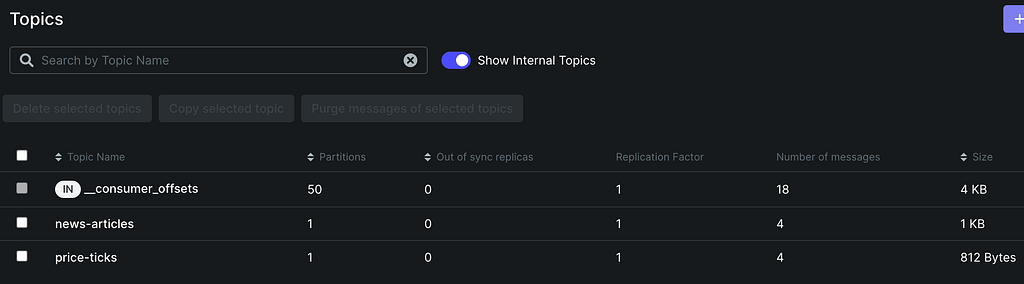
python producers/kafka_admin.py
Step 4: The Sentiment Job — Where Claude Does the Work
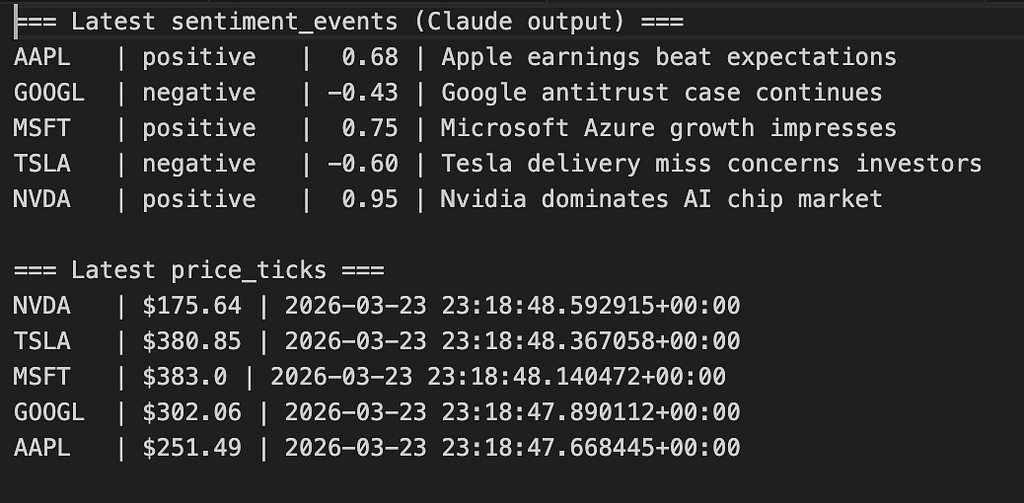
This is the core AI layer. A Python process runs two threads: one consuming price ticks (simple DB write), one consuming news articles (Claude API call + DB write).
The prompt engineering:
SENTIMENT_PROMPT = """Analyze the sentiment of this financial news article \
toward the stock ticker mentioned.
Respond ONLY with a JSON object, no other text:
{{"score": <float between -1.0 and 1.0>, "label": "<positive|negative|neutral>", \
"reasoning": "<one sentence>"}}Article: {text}"""
The prompt does three things:
- Grounds Claude on financial sentiment specifically, not general sentiment
- Forces structured JSON output — no parsing ambiguity. Here, we would have used Pydantic, but simple prompt works as expected for this project.
- Asks for a reasoning field, which becomes invaluable for debugging and the GEval evaluation later.
The Claude call inside NewsEnricher.map():
message = self.client.messages.create(
    model="claude-haiku-4-5-20251001",
    max_tokens=200,
    messages=[{"role": "user", "content": SENTIMENT_PROMPT.format(text=text)}],
)
raw_response = message.content[0].text.strip()
# Strip markdown code fences if Claude wraps the JSON in ```json ... ```
if raw_response.startswith("```"):
    raw_response = raw_response.split("```")[1]
    if raw_response.startswith("json"):
        raw_response = raw_response[4:]
    raw_response = raw_response.strip()
sentiment = json.loads(raw_response)
That code-fence stripping tripped me up early on. Claude occasionally wraps JSON responses in json blocks despite explicit instructions not to — always strip defensively.
Why threaded consumers instead of PyFlink?
My original plan used PyFlink. After spending an afternoon fighting apache-beam dependency failures on Python 3.12, I scrapped it. For a single-node local pipeline, threaded consumers give identical behavior — the business logic (Claude API call, DB write) is identical either way. No JVM, no classpath hell, zero configuration overhead.
def main():
    news_thread = threading.Thread(
        target=_run_consumer,
        args=("news-articles", "sentiment-job-news", NewsEnricher()),
        daemon=True,
    )
    price_thread = threading.Thread(
        target=_run_consumer,
        args=("price-ticks", "sentiment-job-price", PriceWriter()),
        daemon=True,
    )
    news_thread.start()
    price_thread.start()
    try:
        news_thread.join()
        price_thread.join()
    except KeyboardInterrupt:
        logger.info("Shutting down sentiment job.")
Step 5: TimescaleDB + dbt — From Raw Events to Business Signals
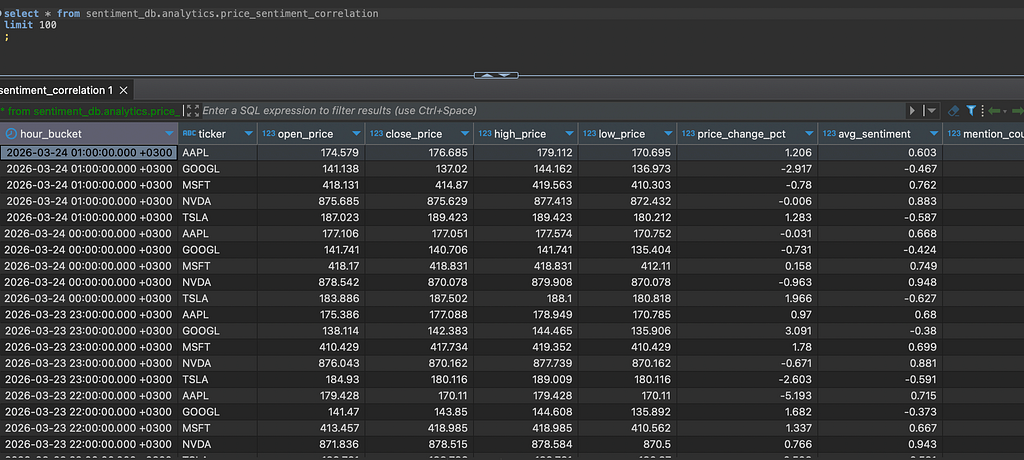
Raw sentiment events are noisy. A single article might be an outlier. The sentiment_signals mart aggregates by ticker per hour, computes the average sentiment score, counts positive/negative/neutral articles, and assigns a signal classification.
The dbt project has three layers:
staging/
  stg_price_ticks.sql          ← clean view over price_ticks (last 7 days)
  stg_sentiment_events.sql     ← clean view over sentiment_events (last 7 days)
marts/
  sentiment_signals.sql        ← hourly aggregates, bullish/bearish/neutral signal
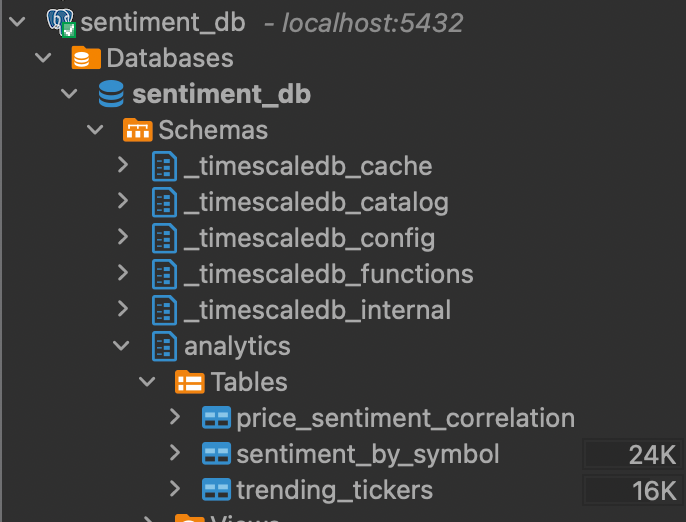
analytics/
  sentiment_by_symbol.sql      ← per-symbol summary with momentum
  trending_tickers.sql         ← tickers with most sentiment movement
  price_sentiment_correlation.sql  ← correlation coefficient by ticker
The mart SQL is where the signal gets defined:
case
    when s.avg_sentiment >  0.3 then 'bullish'
    when s.avg_sentiment < -0.3 then 'bearish'
    else 'neutral'
end as signal
Running all 6 models takes about 0.6 seconds:
cd dbt && dbt run
# 06:12:43  6 of 6 OK created sql table model analytics.price_sentiment_correlation
# 06:12:43  Finished running 6 models in 0 hours 0 minutes and 0.61 seconds
Step 6: The Grafana Dashboard
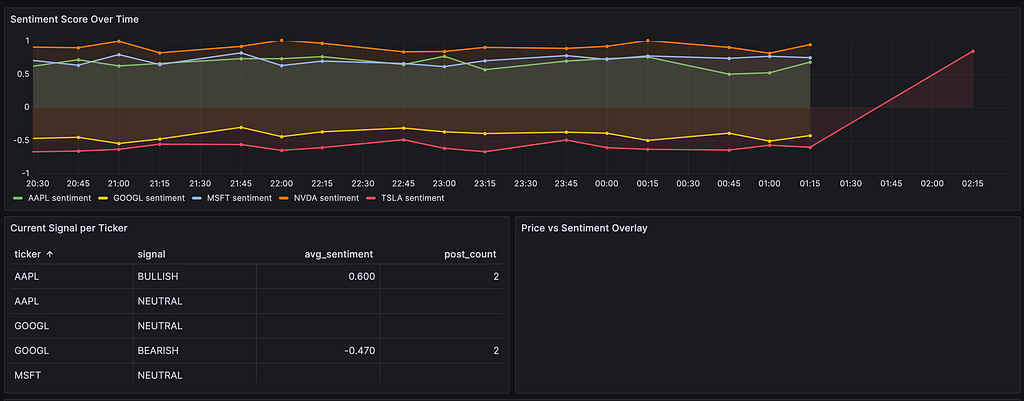
This is the payoff moment. Four panels, all querying TimescaleDB directly, refreshing every 30 seconds.
Panel 1 — Sentiment Score Over Time (Time Series)
SELECT
  time_bucket('15 minutes', event_time) AS time,
  ticker,
  avg(sentiment_score) AS avg_sentiment
FROM sentiment_events
WHERE $__timeFilter(event_time)
GROUP BY 1, 2
ORDER BY 1
Panel 2 — Current Signal per Ticker (Stat panel)
SELECT ticker, signal, avg_sentiment
FROM sentiment_signals
WHERE event_hour = date_trunc('hour', now())
ORDER BY ticker
Panel 3 — Price vs Sentiment Overlay (dual Y-axis)
SELECT
  time_bucket('1 minute', p.event_time) AS time,
  p.ticker,
  avg(p.price) AS price,
  avg(s.sentiment_score) AS sentiment
FROM price_ticks p
LEFT JOIN sentiment_events s
  ON  time_bucket('15 minutes', p.event_time)
    = time_bucket('15 minutes', s.event_time)
  AND p.ticker = s.ticker
WHERE $__timeFilter(p.event_time)
GROUP BY 1, 2
ORDER BY 1
Panel 4 — News Article Volume (Bar chart)
SELECT
  time_bucket('1 hour', event_time) AS time,
  ticker,
  count(*) AS article_count
FROM news_articles
WHERE $__timeFilter(event_time)
GROUP BY 1, 2
ORDER BY 1

Step 7: The AI Market Analyst Agent
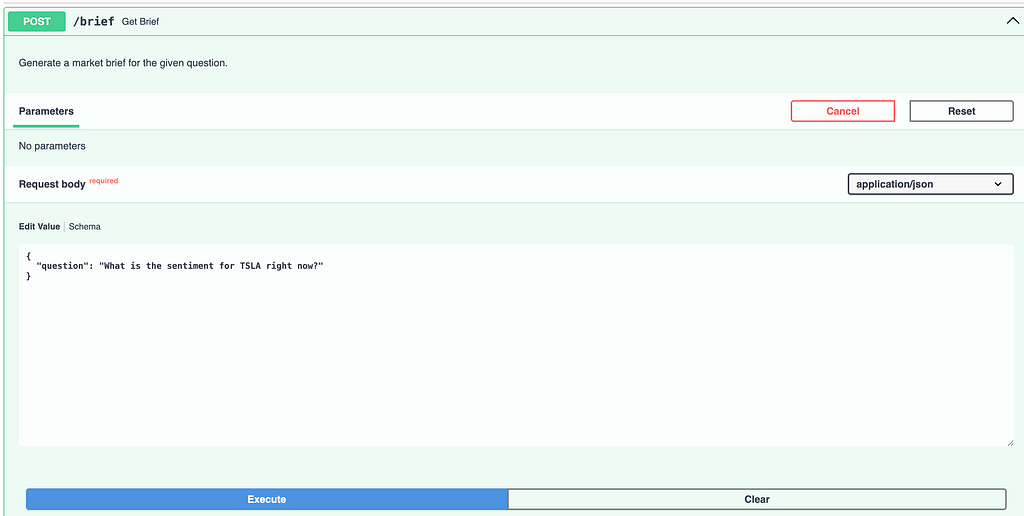
Beyond the dashboard, I built a natural-language query interface using LangGraph and FastAPI. Ask it anything about the market data, it figures out what SQL to run, queries the analytics tables, and synthesizes a market brief.
The agent has a single SQL tool:
@tool
def query_sentiment_data(sql: str) -> str:
    """Execute a read-only SQL query against the analytics schema."""
    conn = psycopg2.connect(**DB_CONFIG)
    try:
        with conn.cursor() as cur:
            cur.execute(sql)
            columns = [d[0] for d in cur.description]
            rows = cur.fetchmany(50)
            return json.dumps({"columns": columns, "rows": rows}, default=str)
    finally:
        conn.close()
The agent is built with create_react_agent from LangGraph:
def build_agent():
    llm = ChatAnthropic(model="claude-haiku-4-5-20251001", temperature=0)
    return create_react_agent(llm, [query_sentiment_data], prompt=SYSTEM_PROMPT)
Real query and output:
curl -s -X POST http://localhost:8000/brief \
  -H "Content-Type: application/json" \
  -d '{"question": "Which ticker has the most bearish sentiment right now?"}' \
  | jq .brief
**Symbol:** TSLA
**Sentiment:** Strongly negative at -0.78, deteriorating over last 3 hours
**Price:** $172.31, down 1.2% in the last hour
**Signal:** Bearish sentiment confirmed by price action
**Confidence:** Medium (12 articles in window)

Step 8: Evaluating the AI — GEval with Claude as Judge
The hardest question with any LLM pipeline: “Is the AI actually getting this right?”
I used DeepEval’s GEval metric framework, which lets you define evaluation criteria in plain English and score outputs against them. The twist: I used Claude Haiku as both the scorer and the judge, creating a closed evaluation loop with zero external dependencies.
Two metrics on a 50-article golden dataset (hand-labeled):
Label Faithfulness — Does the label (positive/negative/neutral) match the reasoning?
faithfulness_metric = GEval(
    name="Label Faithfulness",
    criteria="""The sentiment label must be consistent with the reasoning.
    A 'positive' label must have reasoning explaining why the article is positive.
    A 'negative' label must have reasoning explaining bearish content.
    A 'neutral' label should indicate balanced or factual reporting.""",
    evaluation_params=[LLMTestCaseParams.ACTUAL_OUTPUT],
    model=_judge,
)
Score Direction Accuracy — Does the sign of the score (+/−) match the human label?
score_calibration_metric = GEval(
    name="Score Direction Accuracy",
    criteria="""The numeric score must match the expected sentiment direction.
    Positive scores (>0) for positive sentiment.
    Negative scores (<0) for negative sentiment.
    Near-zero scores (-0.3 to 0.3) for neutral sentiment.""",
    evaluation_params=[LLMTestCaseParams.ACTUAL_OUTPUT, LLMTestCaseParams.EXPECTED_OUTPUT],
    model=_judge,
)
Results on the golden dataset:
- faithfulness (10 examples) -> 100%
- accuracy (50 examples) -> 96% (48/50 correct sign)
Lessons Learned
PyFlink on Python 3.12 is a non-starter. The apache-beam dependency fails at install time with ModuleNotFoundError: No module named 'pkg_resources'. I replaced the entire Flink runtime with threaded Kafka consumers in about 30 minutes. Identical behavior, zero JVM dependency. Don't fight your environment.
Claude occasionally wraps JSON in code fences. Even with explicit instructions to respond “ONLY with a JSON object, no other text,” Claude will sometimes wrap the response in ```json blocks. Always strip defensively — one line of handling saves hours of debugging in production.
DeepEval’s GEval requires a judge model, and it defaults to OpenAI. If you don’t have an OpenAI key, set model=AnthropicModel(...) explicitly. Using the same model as scorer and judge is methodologically fine for a closed evaluation — you're testing consistency, not ground truth. But, if we were evaluating the accuracy, using different models (even different LLM providers) would definitely be suggested.
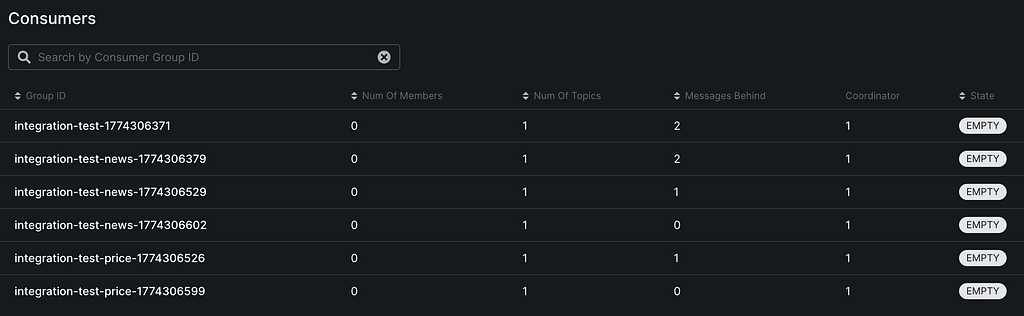
Kafka consumer group IDs matter more than you think. Two processes using the same group_id will split partition ownership, causing each to see only half the messages. Make group IDs explicit and unique per logical consumer. Similarly, zombie consumer processes from previous runs can hold partition leases for 30 seconds after they die — always pkill -f sentiment_job.py before a clean restart.
TimescaleDB’s time_bucket() is what makes Grafana queries elegant. Instead of GROUP BY DATE_TRUNC('15 minutes', event_time), you write GROUP BY time_bucket('15 minutes', event_time). The function is index-aware and communicates intent better in code reviews.
If this saved you time or sparked an idea, consider sponsoring me on GitHub — and if you’re looking for freelance or consultancy work on data pipelines, AI systems, or real-time platforms, reach out to me on X, or via email.
GitHub: https://github.com/dogukannulu
Email: dogukannulu@gmail.com