
Repository
https://github.com/dogukannulu/text-to-sql
Tech Stack
Before diving in, here is every tool, framework, and package used across the project:
LLM & Agent
- Claude Sonnet 4.6 (Anthropic) — SQL generation, self-correction, result explanation
- Claude Haiku 4.5 (Anthropic) — LLM-as-judge for hallucination evaluation
- LangChain 0.3 — LLM wrappers, prompt templates, structured output parsing
- LangGraph 0.2 — stateful agent graph (7 nodes, conditional routing)
- langchain-anthropic 0.2 — Claude integration for LangChain
Embeddings & Vector Search
- Voyage AI voyage-3–1024-dimensional text embeddings
- langchain-voyageai — LangChain wrapper for Voyage AI
- Qdrant — vector store (2 collections: schema + knowledge base)
- qdrant-client 1.8 — Python SDK for Qdrant
API & Backend
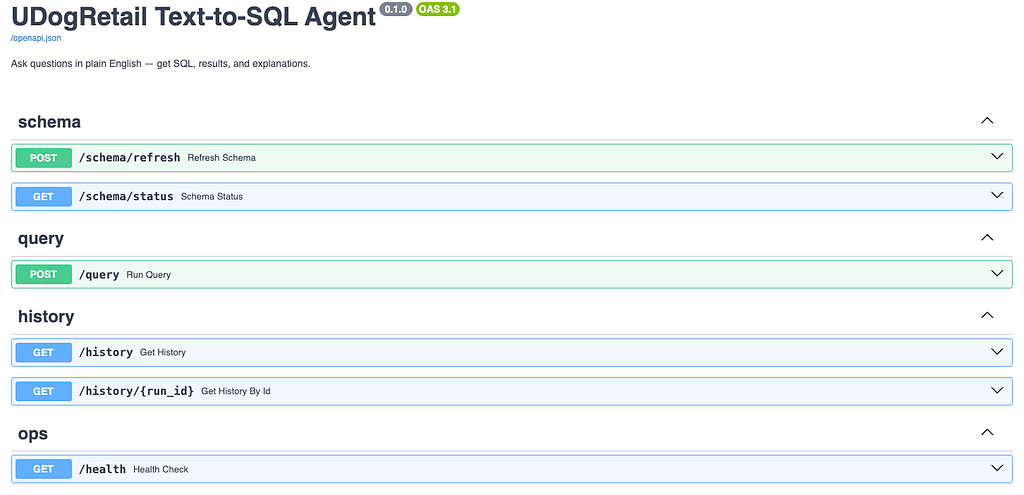
- FastAPI 0.110 — REST API (POST /query, GET /history, POST /schema/refresh)
- Uvicorn 0.29 — ASGI server
- python-multipart — multipart form support for FastAPI
- SQLModel 0.0.16 — ORM (combines SQLAlchemy + Pydantic)
- psycopg2-binary 2.9 — PostgreSQL adapter
- Alembic 1.13 — database migrations
- pydantic 2.6 — data validation and serialisation
- pydantic-settings 2.2 — settings management (.env)
- sqlglot 23.0 — SQL parser for syntax validation (no DB round-trip)
Frontend
- Streamlit 1.33 — chat UI, dataframe display, schema sidebar
Observability & Tracing
- Langfuse (Cloud) — LLM observability: traces, spans, token usage, scores
- langfuse 4.x Python SDK — @observe decorator, score_current_trace()
Evaluation
- deepeval / GEval — evaluation harness framework
- anthropic Python SDK — direct Anthropic API calls for LLM-as-judge
Infrastructure & Config
- Docker + Docker Compose — all 6 services in one compose file
- PostgreSQL 16 (postgres:16-alpine) — primary data store + Langfuse metadata DB
MCP Server
- mcp Python SDK (FastMCP) — MCP server exposing 3 tools to Claude Code
- requests 2.31 — HTTP client for MCP server → backend calls
Testing
- pytest 8.0 — test runner
- pytest-asyncio 0.23 — async test support
- httpx 0.27 — async HTTP client for integration tests
Developer Tooling
- ruff 0.3 — linter and formatter
- mypy 1.9 — static type checker
- python-dotenv — .env file loading
Why I built a Text-to-SQL agent from scratch
Whenever someone wants to easily build queries with pure text, NLQ or text to SQL comes into our minds. That’s why I wanted to know whether a modern LLM stack could close that loop entirely — not just generate SQL, but execute it, explain the results in plain English, and recover gracefully when the query is wrong.
So, I built a production-grade agent with a RAG pipeline, a 7-node LangGraph state machine, full observability, a REST API, a Streamlit UI, an MCP server for Claude Code, and a GEval evaluation harness. The database is fictional (UDogRetail — a dog-products e-commerce company), but every architectural decision reflects something I’d do on a real project.
This article walks through how I built it, every non-obvious decision I made, and everything that went wrong.
The full code is on GitHub: clone it, run docker compose up, and it works in under five minutes.
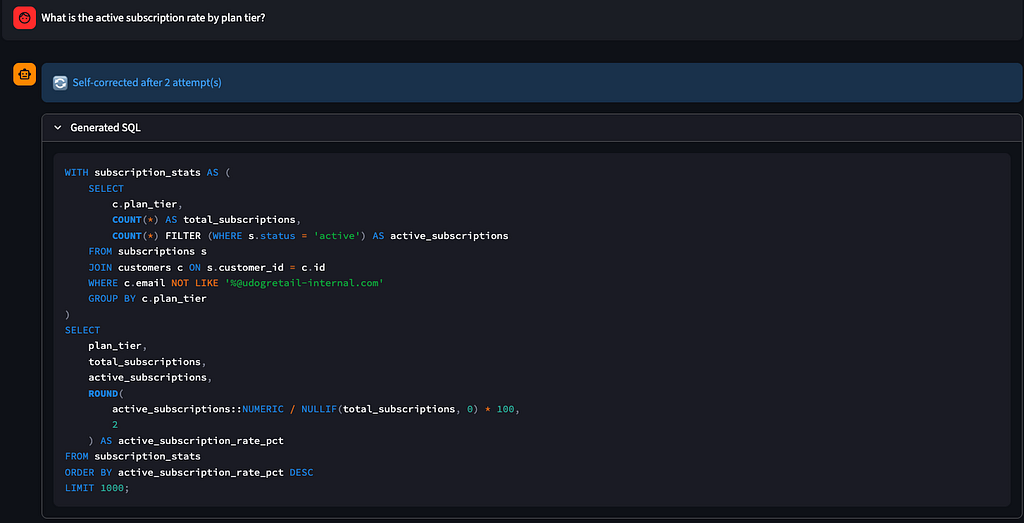
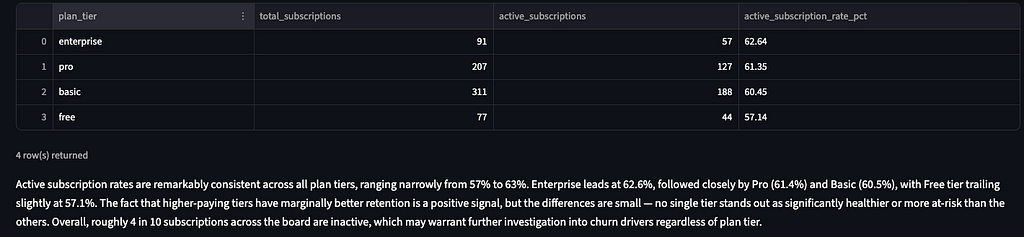
1. The UDogRetail dataset — designing a realistic test environment
Real databases and semantic layers are messy. They have tables with ambiguous names, columns with legacy conventions, and business rules that exist only in someone’s head. I wanted a test environment that reflected this complexity without needing access to production data.
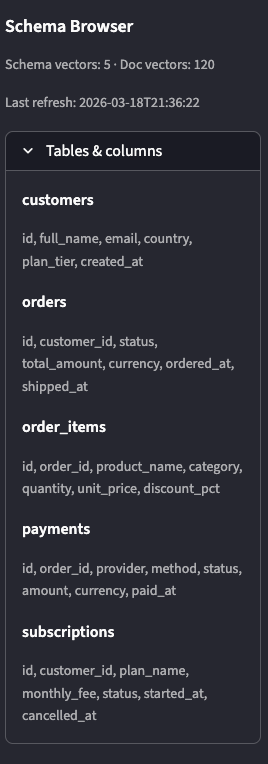
UDogRetail has five business tables:
customers — 1,000 customer records with full_name, email, country, plan_tier
orders — 4,500 orders with a status lifecycle (pending → delivered → refunded)
order_items — ~10,000 line items with product categories and discount percentages
payments — 4,300 payment attempts across four providers (Stripe, PayPal, Klarna, Adyen)
subscriptions — 686 subscription contracts with monthly_fee and cancellation tracking
I generated seed data with a Python script (scripts/generate_seed.py) using random.seed(42) so every fresh clone produces identical data. The data has intentional quirks that make it a good test: mixed currencies (GBP, EUR, USD), nullable shipped_at columns, a multi-table revenue calculation requiring a JOIN across three tables, and a full_name column — not first_name/last_name — that the LLM reliably tries to hallucinate.
I also wrote nine knowledge-base markdown documents covering KPI definitions (MRR, churn rate, ARPU), business rules (how status = ‘active’ filters apply to subscriptions), and data quality notes. These matter because some questions are unanswerable without domain context — “what is our MRR?” requires knowing that MRR = SUM(monthly_fee) WHERE status = ‘active’, not just a count of subscriptions.
2. Architecture overview — how all the pieces fit together
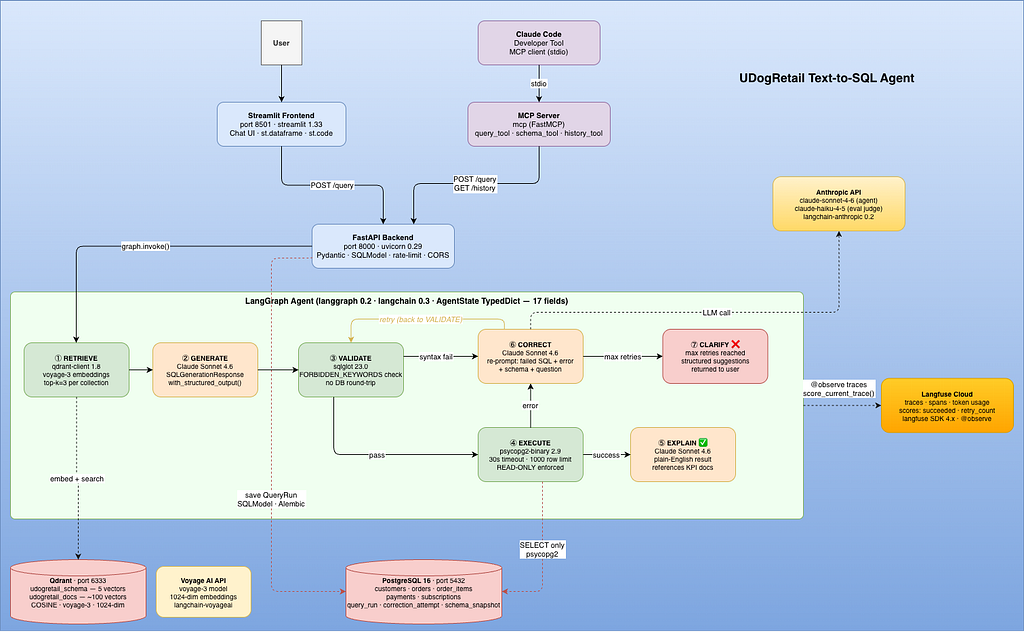
The system has six Docker services, all wired together in a single docker-compose.yml.

The data flow:
- User → Streamlit (8501) → POST /query (FastAPI, 8000) → LangGraph Agent OR Claude Code → MCP Server → POST /query (FastAPI, 8000) → LangGraph Agent
- RETRIEVE (Qdrant)
- GENERATE (Claude)
- VALIDATE (sqlglot)
- EXECUTE (PostgreSQL)
- EXPLAIN ←── success
- CORRECT ←── error (up to 3 retries)
- CLARIFY ←── retries exhausted
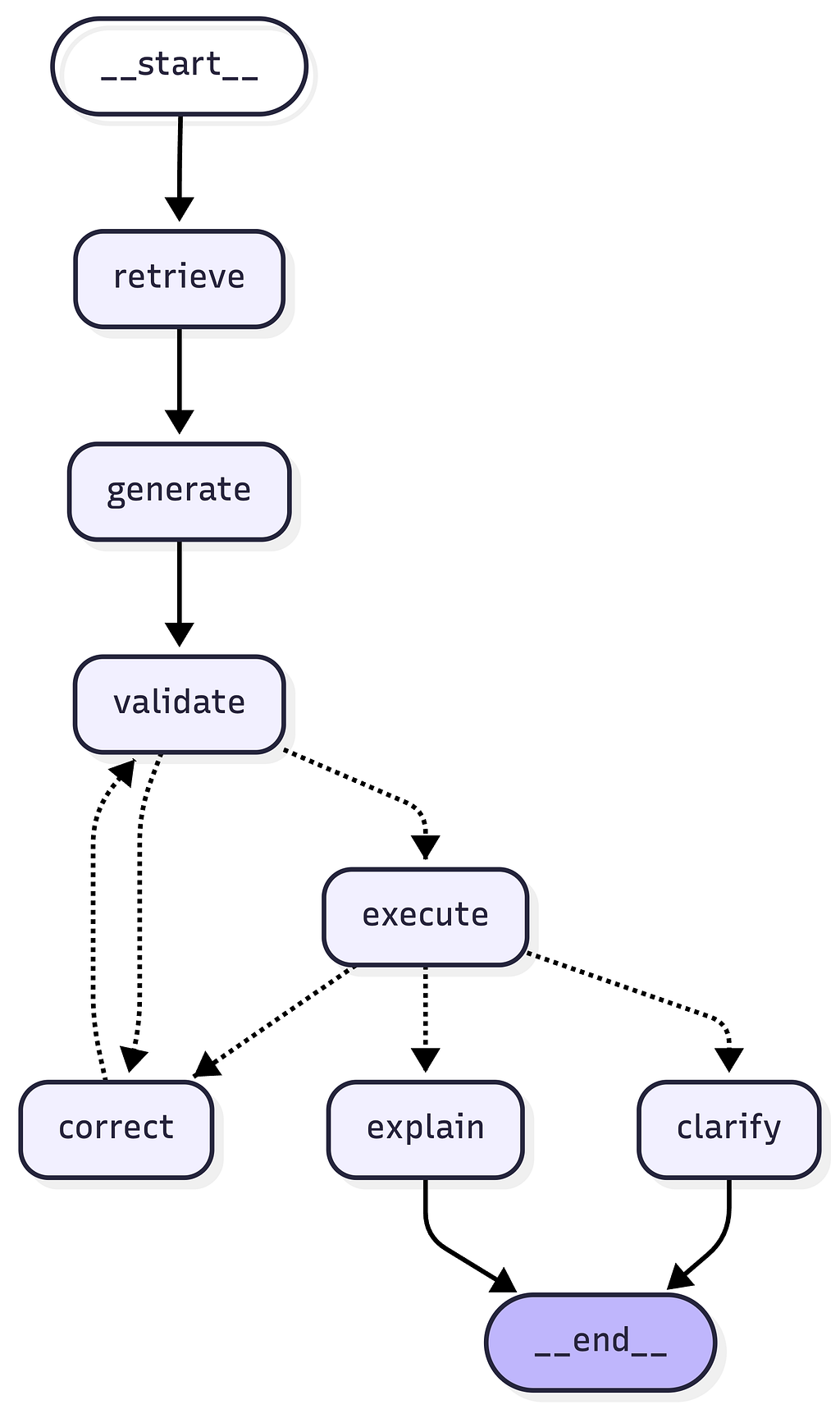
Every query run is traced in Langfuse and saved to a query_run table in PostgreSQL. The MCP server exposes query_tool, schema_tool, and history_tool to Claude Code as a stdio subprocess.
The tech stack I chose and why:
LLM: Claude Sonnet 4.6 (Anthropic) — best structured-output reliability in my testing
Agent: LangGraph 0.2 — explicit state machine, every transition is readable code
Embeddings: Voyage AI voyage-3 — strong retrieval quality, 1024-dimensional vectors
Vector store: Qdrant — simple Docker setup, fast cosine similarity search
API: FastAPI + Uvicorn — async, Pydantic validation built-in
Frontend: Streamlit — functional chat UI in ~300 lines
Observability: Langfuse — token tracking + span-level latency per node
Evaluation: GEval / deepeval — LLM-as-judge for hallucination scoring
Config: pydantic-settings — .env locally, AWS SSM Parameter Store in production
3. Building the RAG pipeline — schema + document retrieval
The most important architectural decision in the whole project: ground the SQL generator in retrieved schema context, not LLM memory.
Without RAG, Claude generates SQL from training data. It knows generic SQL patterns perfectly, but it doesn’t know that UDogRetail uses full_name instead of first_name/last_name, or that MRR is defined as SUM(monthly_fee) WHERE status = ‘active’. Every query that requires either of these will hallucinate.
Schema indexing
I wrote a schema crawler (app/rag/crawler.py) that queries INFORMATION_SCHEMA to extract table names, column names, data types, nullable flags, and foreign key relationships. This runs at startup via the FastAPI lifespan handler.
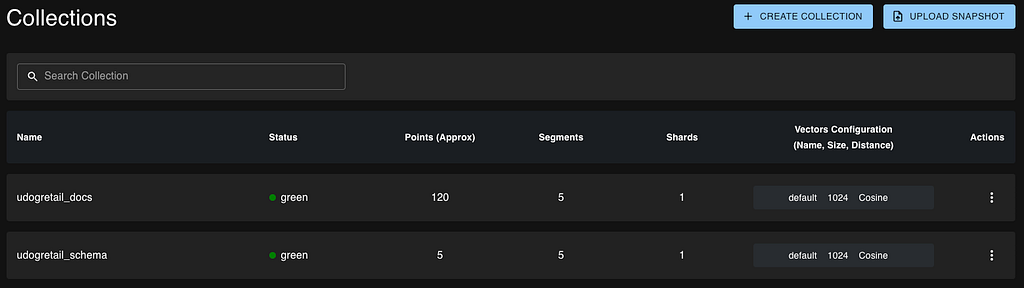
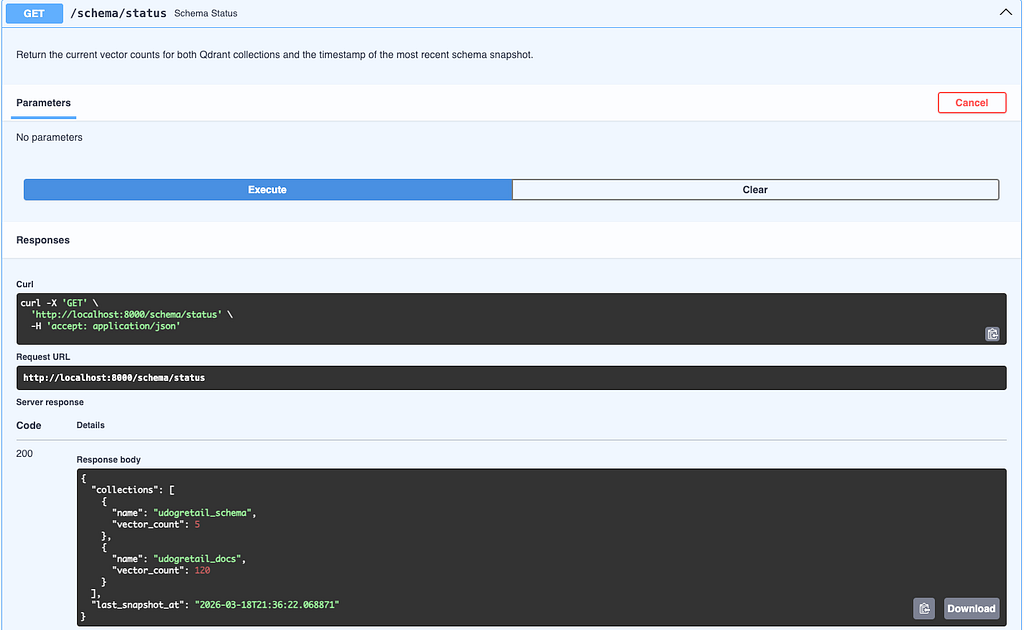
Each table becomes one chunk in Qdrant’s udogretail_schema collection — five vectors total, one per table. The chunk format is deliberately verbose:
Table: customers
Description: Core customer registry. One row per registered user account.
Columns:
- id (uuid, NOT NULL) — Primary key
- full_name (character varying, NOT NULL)
- email (character varying, NOT NULL)
- country (character varying, NOT NULL)
- plan_tier (varchar, NOT NULL)
- created_at (timestamptz, NOT NULL)
Foreign keys: none
The full column name, type, and nullability are in every chunk. When a question is embedded and searched, the schema chunks that come back give Claude the exact column names — no guessing allowed.
Knowledge base indexing
Nine markdown documents live in backend/knowledge_base/. They cover things the schema can’t express: what “active subscription” means, how to calculate MRR, which currency to use when grouping revenue, and known data quality issues.
These are split with RecursiveCharacterTextSplitter at 400 tokens with 40-token overlap, producing ~100 chunks in the udogretail_docs collection.
Retrieval
At query time, retrieve_context() embeds the user’s question with voyage-3 and searches both collections (udogretail_schema and udogretail_docs) in parallel using ThreadPoolExecutor(max_workers=2). The top-3 results from each collection are merged and sorted by relevance score — always the most relevant schema tables and the most relevant business rules, delivered together to the GENERATE node.
4. The LangGraph agent — nodes, state, and self-correction
The agent is a StateGraph with seven nodes. Every node receives and returns an AgentState TypedDict — 17 fields covering the question, retrieved context, generated SQL, execution result, error history, and Langfuse trace ID.
class AgentState(TypedDict):
  question: str
  session_id: str
  retrieved_schema: list[str]
  retrieved_docs: list[str]
  generated_sql: Optional[str]
  sql_reasoning: Optional[str]
  sql_assumptions: list[str]
  sql_confidence: float
  validation_error: Optional[str]
  execution_result: Optional[ExecutionResult]
  execution_error: Optional[str]
  retry_count: int
  correction_history: list[CorrectionRecord]
  needs_clarification: bool
  clarification_message: Optional[str]
  final_explanation: Optional[str]
  langfuse_trace_id: Optional[str]
GENERATE
The GENERATE node calls Claude with a structured output schema (SQLGenerationResponse) using LangChain’s with_structured_output(model, include_raw=True). The include_raw=True flag is crucial — it gives back both the parsed Pydantic model AND the raw AIMessage with usage_metadata, so I can log token counts to Langfuse without a second API call.
The system prompt has one rule that saved me hours of debugging:
CRITICAL: Use ONLY the exact column names shown in the schema above.
Never guess or invent column names. If a name feels intuitive (e.g. first_name, last_name) but is not in the schema, it does NOT exist — use what is shown (e.g. full_name).
Without this constraint, Claude reliably generates c.first_name || ‘ ‘ || c.last_name for any customer name query. The column is full_name. The “CRITICAL:” label is not decoration — Claude follows explicitly labelled constraints more reliably than softly worded ones.
VALIDATE → EXECUTE
The VALIDATE node runs sqlglot.parse(sql, dialect=”postgres”) before touching the database. Syntax errors caught here are cheaper than round-tripping to PostgreSQL.
The EXECUTE node (app/tools/pg_executor.py) enforces read-only access with a FORBIDDEN_KEYWORDS check:
FORBIDDEN_KEYWORDS = frozenset({
"INSERT", "UPDATE", "DELETE", "DROP",
"TRUNCATE", "ALTER", "CREATE", "GRANT", "REVOKE"
})
Every token in the SQL is checked against this set before execution. The database also runs with SET LOCAL statement_timeout so runaway queries can’t hang the server.
The self-correction loop
The routing after EXECUTE is the heart of the agent:
def route_after_execute(state: AgentState) -> str:
  if state["execution_error"] is None:
    return "explain"
  if state["retry_count"] >= settings.max_retries:
    return "clarify"
    return "correct"
CORRECT re-prompts Claude with the original question, full schema context, the failed SQL, and the PostgreSQL error message. The CorrectionRecord is appended to correction_history so each retry knows what was tried before. CORRECT always routes back through VALIDATE — corrected SQL still needs a syntax check before hitting the database.
After MAX_RETRIES (default: 3), the CLARIFY node generates a user-friendly message with specific suggestions: rephrase with exact column names, break the question into parts, specify a currency for monetary questions.
5. Making it production-ready — FastAPI, Docker, Terraform
The API
The API has three route groups — /query, /history, and /schema. All I/O is typed with Pydantic:
- QueryRequest: question (5–500 chars), session_id (UUID string)
- QueryResponse: full result including SQL, rows, explanation, retry count, succeeded flag
- QueryRunSummary / QueryRunDetail: history endpoint shapes
Rate limiting (max 10 requests/minute per session_id) protects against runaway clients. CORS allows localhost:8501 (Streamlit) and localhost:8080 (MCP server) in local mode.
Docker
All six services are defined in docker-compose.yml. The backend Dockerfile runs Alembic migrations before starting uvicorn:
#!/bin/bash
# backend/start.sh
set -e
echo "==> Running Alembic migrations…"
cd /app/backend && alembic upgrade head
echo "==> Starting uvicorn…"
exec uvicorn app.main:app - host 0.0.0.0 - port 8000
This guarantees the query_run, correction_attempt, and schema_snapshot tables exist before the first request arrives — no race conditions between migration and serving.
Configuration
app/config.py uses pydantic-settings BaseSettings for local development and fetches secrets from AWS SSM Parameter Store when APP_ENV=production (in our case, they are kept in .env):
class Settings(BaseSettings):
  anthropic_api_key: SecretStr
  voyage_api_key: SecretStr
  postgres_password: SecretStr
  langfuse_secret_key: SecretStr
# All secrets use SecretStr — never logged as plaintext
The SSM path convention is /udogretail/text2sql/{FIELD_NAME}. Swapping from local to production is a single env var change.
6. Observability with Langfuse — tracing every agent run
Every POST /query call creates a Langfuse trace. Every node in the agent creates a child span. I used Langfuse SDK v4’s @observe decorator — it wraps functions automatically and attaches them to the active trace context:
@observe(name="generate", as_type="generation")
def generate(state: AgentState) -> AgentState:
# Claude call happens here
# Langfuse auto-captures input, output, latency
For Claude calls, I use with_structured_output(model, include_raw=True) to capture token counts from raw_response.usage_metadata and log them to the active span:
lf = get_lf_client()
lf.update_current_observation(
model="claude-sonnet-4–6",
usage={"input": input_tokens, "output": output_tokens},
)
The result: every trace shows retrieve → generate → validate → execute → explain with latency per node and token counts per Claude call. I also log two scores per trace — succeeded (1.0 or 0.0) and retry_count — so I can filter traces by quality in the Langfuse scores panel.

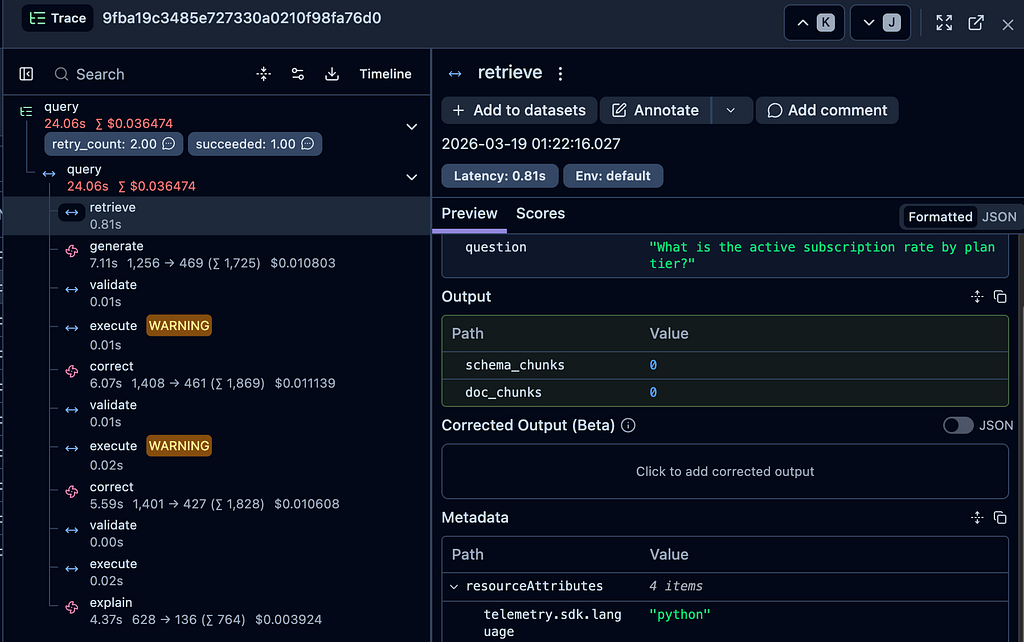
Three things I learned about Langfuse SDK v4:
1. @observe replaces the old CallbackHandler. The v4 SDK dropped langfuse.callback entirely. If you’re migrating, rewrite every LangChain integration with @observe.
2. docker compose restart doesn’t re-read .env. Use docker compose up -d service to recreate the container with new environment variables.
3. SDK v4 requires Langfuse Cloud or a v3+ self-hosted server. The langfuse/langfuse:2 Docker image is not compatible with SDK v4’s OTLP ingestion format. For anything new, use Langfuse Cloud.
7. Testing — unit tests and integration tests
A production agent needs a test suite that runs without thinking about it. I split the tests into two layers: unit tests that run offline in milliseconds, and integration tests that hit the running Docker stack.
Unit tests
Five unit test files cover the pure-logic components that have no external dependencies.
test_sql_validator.py — the most important unit test file. It verifies that validate_sql() correctly rejects every forbidden keyword regardless of case, including keywords buried inside CTEs:
@pytest.mark.parametrize("keyword", sorted(FORBIDDEN_KEYWORDS))
def test_forbidden_keyword_rejected(keyword: str) -> None:
  sql = f"{keyword} INTO orders VALUES ('x')"
  result = validate_sql(sql)
  assert not result.is_valid
  assert keyword in result.error_message
  def test_forbidden_keyword_in_cte_still_rejected() -> None:
  sql = "WITH x AS (DELETE FROM orders RETURNING id) SELECT * FROM x"
  result = validate_sql(sql)
  assert not result.is_valid
This is the security boundary of the entire agent — if validate_sql lets a write statement through, it hits PostgreSQL. The parameterised test ensures every keyword in FORBIDDEN_KEYWORDS is tested individually, including case-insensitive variants.
test_crawler.py — uses a mock SQLModel session to verify crawl_schema() returns the correct SchemaMetadata structure without touching a real database.
test_chunker.py — verifies that chunk_schema() produces one chunk per table and that the chunk text contains the table name, column names, and types.
test_config.py — verifies that get_settings() loads correctly from environment variables and that all secret fields are SecretStr instances (never plain strings).
test_agent_state.py — verifies that AgentState can be instantiated with all 17 fields correctly typed.
Run unit tests with no Docker required:
pytest tests/unit/ -v
Integration tests
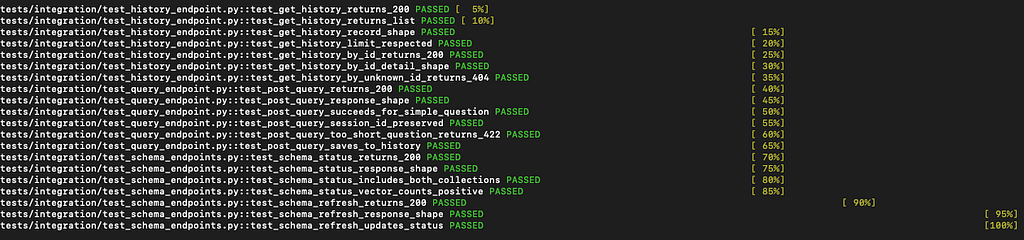
Three integration test files run against the live Docker stack — they make real HTTP requests to http://localhost:8000.
test_query_endpoint.py — six tests covering the full /query flow: HTTP 200, correct response shape, succeeded=True for a simple question, session_id round-trip, HTTP 422 for a question under 5 characters, and that a query is saved to history.
test_schema_endpoints.py — verifies GET /schema/status returns vector counts for both Qdrant collections and POST /schema/refresh returns HTTP 200.
test_history_endpoint.py — verifies GET /history and GET /history/{id} return the correct shapes.
The design principle: integration tests assert on structure, not values. assert data[“succeeded”] is True and assert “SELECT” in data[“sql”].upper() — not assert data[“result”][0][“count”] == 1000. Values change when the seed data changes; structure doesn’t.
# Docker stack must be running
pytest tests/integration/ -v
20/20 integration tests pass against the live stack.
8. Evaluating the agent with GEval
I built a 32-case golden test set covering three complexity levels and ran three metrics:
SQL Correctness — does the query return the expected result columns?
Schema Faithfulness — does the generated SQL reference only tables and columns that actually exist in the schema? Checked by parsing the SQL with sqlglot and comparing every identifier against the live schema.
Hallucination — is the plain-English explanation faithful to the actual query results? Scored by an LLM-as-judge using claude-haiku-4–5:
prompt = f"""
Score from 0.0 to 1.0 whether this explanation is faithful to the results.
Results: {json.dumps(rows[:5])}
Explanation: {explanation}
Return only JSON: {{"score": float, "reasoning": str}}
"""
Running the harness:
python -m evaluation.harness --complexity simple
python -m evaluation.harness --limit 10
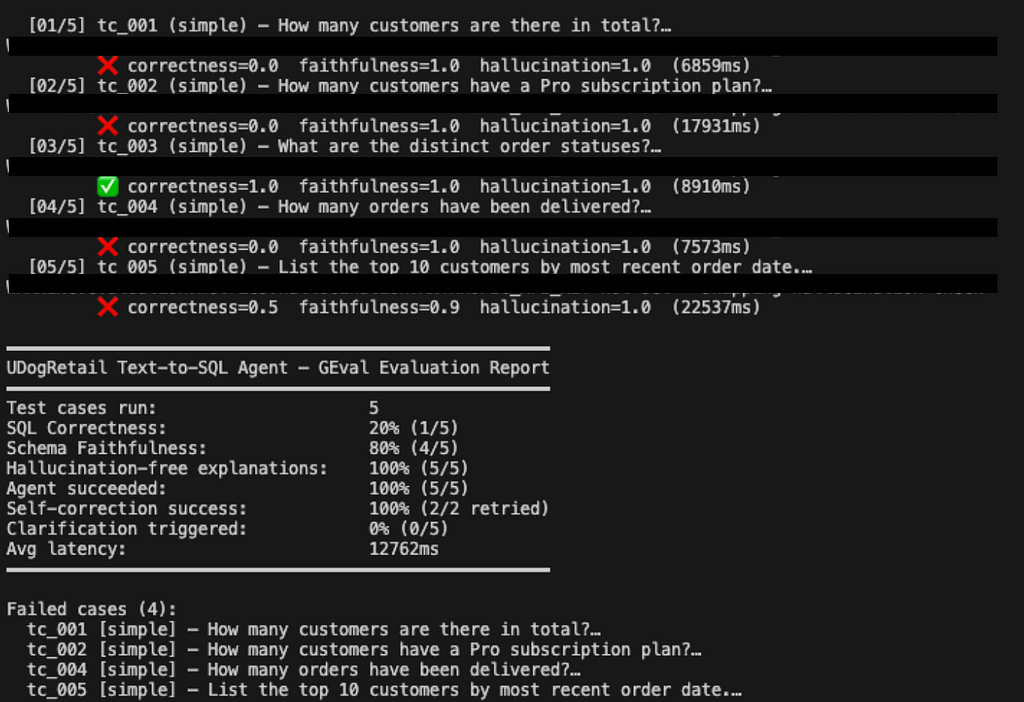
The test set includes five “trick” questions that require knowledge-base docs to answer correctly — questions like “what is our MRR?” (requires the business rule status = ‘active’) and “show customers with duplicate payments” (requires knowing this data quality issue is documented in the knowledge base). These are the questions that fail without RAG and pass with it.
9. The MCP server — making it a Claude Code citizen
We can invoke the FastAPI endpoint via Streamlit. But, we can also do the same using an MCP server using Claude Code.
The MCP server (mcp_server/server.py) uses FastMCP to expose three tools to Claude Code:
mcp = FastMCP(name="udogretail-text2sql")
@mcp.tool()
def query_tool(question: str, session_id: str = "") -> str:
"""Run a natural-language question through the Text-to-SQL agent."""
…
@mcp.tool()
def schema_tool(keyword: str) -> str:
"""Look up tables and columns matching a keyword."""
…
@mcp.tool()
def history_tool(limit: int = 5) -> str:
"""Fetch the last N query runs from agent history."""
…
The .mcp.json at the repo root registers it as a stdio subprocess for Claude Code:
{
"mcpServers": {
  "udogretail-text2sql": {
    "type": "stdio",
    "command": ".venv/bin/python",
    "args": ["mcp_server/server.py"],
    "env": {"API_BASE_URL": "http://localhost:8000"}
    }
  }
}
With the Docker stack running, I can ask Claude Code “how many active Pro subscribers are there?” and it calls query_tool directly, returning the SQL and result inline in the terminal.
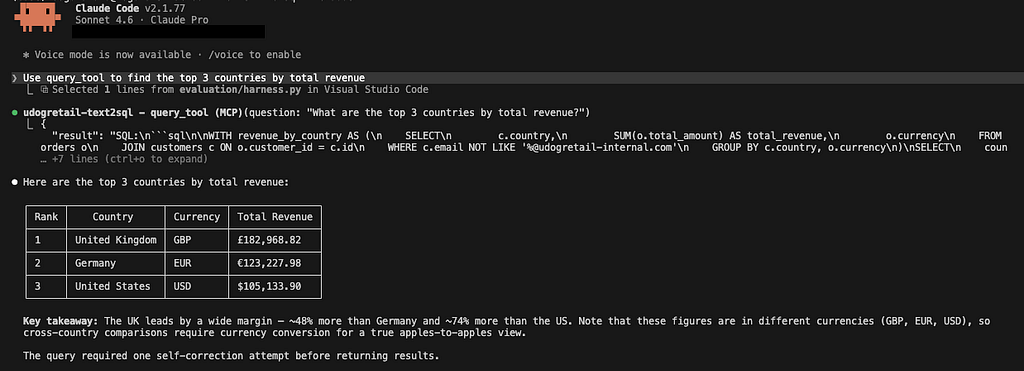
One unexpected issue: a stdio MCP server exits immediately in Docker if stdin is closed. The fix is stdin_open: true and tty: true in the compose service definition. Without these, the container starts and exits with code 0 immediately.
10. Results, lessons, and what I’d do differently
The agent works. It handles simple count queries first-try, joins across three tables with appropriate GROUP BY, and self-corrects the most common errors — wrong column name, missing WHERE clause, incorrect JOIN direction. Langfuse traces confirm the self-correction loop fires roughly 20–30% of the time on harder questions. Clarification is reached rarely on well-formed questions.
What I’d do differently:
More aggressive schema chunk verbosity: The chunks include column types and FK relationships, but not value distributions. Knowing that status has values (‘pending’, ‘confirmed’, ‘shipped’, ‘delivered’, ‘cancelled’, ‘refunded’) — hardcoded in the chunk — would have prevented several early errors where Claude guessed wrong enum values.
Smarter retry routing: The current CORRECT node re-prompts from scratch. A better approach: if the error is “column does not exist”, retrieve fresh schema context before re-prompting. The schema is already there, but explicitly signalling what changed would improve correction rates.
Evaluation before prompt tuning: I tuned the generate prompt by feel during development. Running the GEval harness earlier would have given me a quantitative signal — I could have measured the effect of each prompt change instead of reasoning about it. The changes for prompts into production should happen after seeing better GEval results.
What surprised me:
The column-name hallucination problem is real and consistent. Every time I tested a “top customers by spend” query before adding the CRITICAL: constraint, Claude generated first_name/last_name. After the constraint, it stopped. The fix was four lines of prompt text.
Decimal serialization is a silent failure. PostgreSQL NUMERIC columns return Python Decimal objects, which can’t be serialized to JSON. The error only surfaces at save time — the query succeeds, the results are correct, and then the API returns 500. Sanitising rows to float before saving is one of those fixes that should be in every SQL-over-API stack.
Langfuse SDK version pinning matters. SDK v4 dropped backward compatibility with Langfuse server v2. If you’re self-hosting, make sure your server and SDK versions are aligned. For anything new, use Langfuse Cloud — no version management required.
If you’re looking for freelance or consultancy work on data pipelines, AI systems, or real-time platforms, reach out to me on X, or via email.
And, if this saved you time or sparked an idea, consider sponsoring me on GitHub. Thank you!
GitHub: https://github.com/dogukannulu
Email: dogukannulu@gmail.com